As I continue documenting my cybersecurity journey and preparing for CompTIA Sec+, I’m beginning to understand that vulnerabilities are not always limited to software.
Hardware can be vulnerable too.
A hardware vulnerability is simply a weakness in a physical device or the way that device is designed that an attacker can exploit to gain unauthorized access, compromise information, or affect system operations.
This became even more interesting to me when I started thinking about how connected our world has become.
Today, we have smart light bulbs, smart door locks, security cameras, smart refrigerators, garage doors, smart TVs, connected vehicles, and many other devices connected to networks.
This is where the Internet of Things (IoT) comes in.
The more devices we connect to networks, the larger the potential attack surface becomes. A device that seems harmless, such as a smart light bulb, can still become part of an organization’s or individual’s security landscape if it is connected to a network.
That means cybersecurity has to look beyond just computers and smartphones.
Firmware: Software Inside Hardware
Another concept I came across is firmware.
Firmware is software embedded into a hardware device that helps control how that device operates.
A common example is BIOS/UEFI on a computer.
Unlike regular applications that we can easily download and update, firmware updates are usually provided by the manufacturer of the device.
This is important because manufacturers sometimes discover security vulnerabilities in their hardware and release firmware updates to address them.
For example, imagine an organization has hundreds of network devices running outdated firmware. Even though the physical devices are still working perfectly, outdated firmware could leave those devices exposed to known vulnerabilities.
This is why keeping firmware updated can be an important part of vulnerability management.
EOL – End of Life
I also learned about EOL, which means End of Life.
EOL means that a product has reached the end of its defined lifecycle.
Depending on the manufacturer’s policy, this can mean the product is no longer being sold, developed, or receiving regular updates.
For example, imagine an organization is still using an old network appliance that has reached EOL.
The device may still be functioning perfectly. Employees may still be able to connect to it, and the organization may see no immediate reason to replace it.
But if regular security updates have stopped, newly discovered vulnerabilities could become a serious problem.
So, something being functional does not necessarily mean it is still secure.
EOSL – End of Service Life
Then we have EOSL, or End of Service Life.
EOSL generally means that the vendor has ended normal support and service for the product.
This can include the end of:
- Regular security patches
- Firmware updates
- Technical support
- Vendor maintenance
Some manufacturers may offer extended or premium support after this point, but that support may come at an additional cost.
If an organization cannot or does not want to pay for extended support, it may eventually have to replace the device or migrate to another solution.
The easiest way I currently remember the difference is:
EOL → The product lifecycle has ended.
EOSL → Normal vendor support or service has ended.
Legacy Platforms
Another concept that caught my attention is legacy platforms.
A legacy platform is an older hardware device, operating system, application, or technology that is still being used even though newer alternatives exist.
And one important thing I learned is:
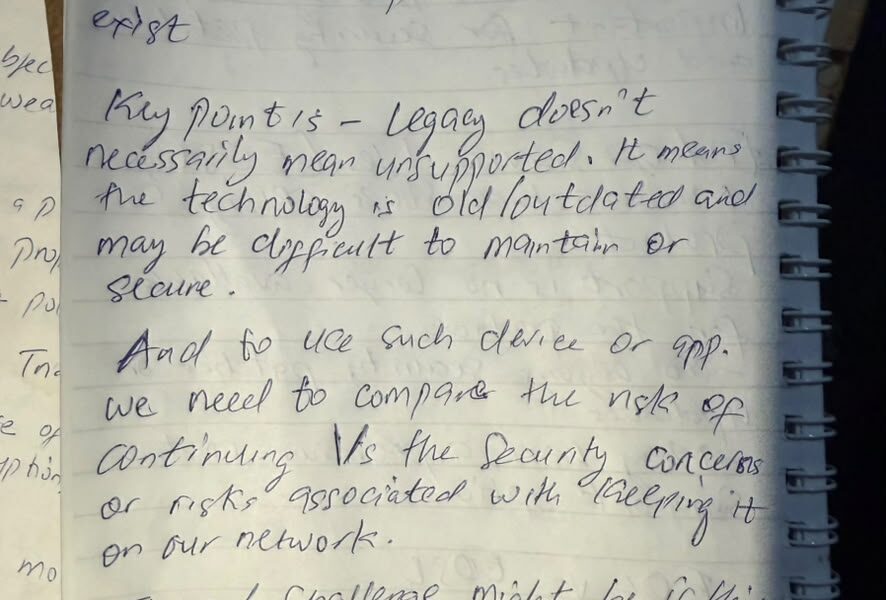
Legacy does not automatically mean unsupported.
A legacy system can still receive some form of support. The key point is that the technology is old and may be more difficult to maintain, patch, integrate, or secure.
For example, imagine a bank has an old application that has been running for many years and is responsible for an important part of its operations.
Replacing it may not be as simple as installing a newer application.
There could be compatibility issues, migration costs, downtime, training requirements, and other business concerns.
This creates a security dilemma.
The organization has to compare the risk of continuing to use the legacy platform with the risk, cost, and operational impact of replacing it.
What If You Can’t Replace the Legacy System Immediately?
This is where security controls and risk management become important.
If a legacy system is critical to an organization’s operations and cannot be replaced immediately, the organization can introduce additional controls to reduce its exposure.
For example:
- Network segmentation – isolate the legacy system from other parts of the network.
- Firewall restrictions – limit which systems can communicate with it.
- Access controls – allow only authorized users or systems to access it.
- Increased monitoring – closely monitor activity around the system for suspicious behavior.
- Limit internet connectivity – prevent unnecessary direct exposure to the internet.
For example, instead of allowing an old server to communicate freely across the entire corporate network, the organization could place it in a separate network segment and only allow the specific connections it actually needs.
This doesn’t magically make the legacy system secure.
It simply reduces the risk while the organization works toward a better long-term solution.
What I’m Taking Away From This
One thing cybersecurity continues to teach me is that security isn’t always about completely eliminating every risk.
Sometimes, that’s simply not possible.
Organizations have old systems. They have business requirements. They have budgets. They have technologies that cannot be replaced overnight.
The important thing is to understand the risk and manage it properly.
As I continue studying Security+, concepts like hardware vulnerabilities, firmware, EOL, EOSL, and legacy platforms are helping me understand cybersecurity beyond just attacks and tools.
I’m beginning to see the bigger picture: technology has a lifecycle, vulnerabilities exist at different layers, and security decisions have to consider both technical and business risks.
Still learning. Still documenting.
I continue to learn, connect with people in cybersecurity, and build my knowledge one concept at a time. 🔐
#Cybersecurity #CompTIASecurityPlus #SecurityPlus #HardwareSecurity #IoT #CybersecurityJourney #InfoSec